peterigz

Forum Replies Created
-
AuthorPosts
-
peterigzKeymasterThanks for the report, are you extracting zip first before running the Exe? And is the location writable? You could try running as administrator maybe.
Do you know what driver version you have? Unlikely to be the issue but you ever know. Oh and did previous versions work or is this the first version you tried?
In the next alpha I’ll have more logging for crashes like this to help track things down. I can test locally on amd and intel cpus with amd 6600, nvidia 1660 and a very cheap nvidia 710 gpus so in theory your system should be fine.
peterigzKeymasterOk, you can try again, download from the same link here.
I was able to recreate the error, I just wasn’t including all the appropriate files to load the drivers required for the renderer and didn’t notice here because of course I have all the SDKs installed so it was still able to find them.
I used my old macbook and completely removed the SDK from there to recreate issue. Now it’s working fine on there with the new version so fingers crossed it works for you now.
peterigzKeymasterI think I’ve found what the issue probably is, not entirely sure why it works ok to start with on my macs, but hopefully can upload a new version with extra logging as well soon.
peterigzKeymasterOk thanks for the report, will see if I can figure out what’s going on, what Mac do you have? What I’ll probably do is try and get all the validation layer debugging to output to a text file and ask you to run that and then send me it to get more precise details.
It’s probably something stupid I’ve overlooked as I’m still not very familiar with the Mac build and release system, thanks for the help debugging though!
-
This reply was modified 2 years, 1 month ago by
peterigz.
peterigzKeymasterNow Available to test on the download page.
This is a universal version that works on ARM and Intel Macs. Check the orientation section on the Help tab (under getting started) to see some of the main differences are between this and the old version.
peterigzKeymasterI now have an ARM Mac and already have it compiling and running having remapped the Intel intrinsic stuff. Just need a few niggles ironed out then should be good to go 🙂
peterigzKeymaster
peterigzKeymasterOk, I guess previous versions of mac os must have emulated intel cpus for older software as I don’t think the old version would have been arm enabled. Either way hopefully I can cross compile I will just need to map some intel intrinsics to the arm equivalents, unfortunately I won’t be able to test it very easily.
peterigzKeymasterWell there’s good news and bad news. The bad news is that I’ll probably discontinue the old version of TimelineFX Mac version as a lot of the things that I developed it with are no longer supported so I’m not even sure if I can get it working again.
The good news is that I’ve been working hard on the new version for mac over the last week and it’s is now fully working – I may even be able to release later today, I just need to fix a couple of issues. It is possible to convert old eff files in the new editor although some tweaking will probably be required due to some feature differences.
Whilst the new version has more features then the old it currently only deals with png files but if you let me know any other file formats you use I can add them.
It would be nice to keep the old version going a little longer but it’s hard to justify spending the time on it now and would rather focus completely on the new version which is way more future proof.
I’m assuming you still have intel based macs? I can only compile intel for now but should be able to cross compile for arm as well soon. I’m actually compiling with Monterey as my Mac is from 2015 is apparently too old but I don’t think that should be a problem.
-
This reply was modified 2 years, 1 month ago by
peterigzKeymasterSorry for the delay, I’ll take a look and see.
peterigzKeymasterAhh ok interesting, my amd card wasn’t catching that, I forgot to switch off vulkan debug mode in that version which I guess causes some problems in a production build.
For the pink mask, that’s actually a feature which you can turn off on the animation tab settings. It just helps to see if the animation is all within the frame, sometimes it’s hard to tell when some of the particles are quite faint and you want to make sure the particles aren’t overlapping the edge
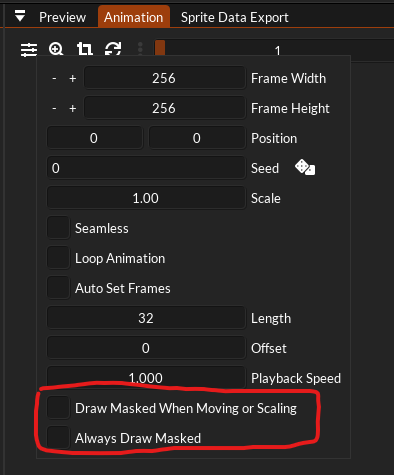
peterigzKeymasterJust uploaded a new version with a fix for this, thanks for the report!
peterigzKeymasterQuick update, new amd card arrived today and recreated the issue. Already got a fix for it so will release a new version early next week.
peterigzKeymasterThanks! Will look into this and hopefully fix for next alpha.
peterigzKeymasterThanks xretrosoft! And apologies for this post being in limbo for so long I didn’t realise the forum plugin had put it into “waiting for approval” mode without telling me 🙂
-
This reply was modified 2 years, 1 month ago by
-
AuthorPosts
