peterigz

Forum Replies Created
-
AuthorPosts
-
peterigzKeymasterThat looks great Pawel 🙂
peterigzKeymasterCan you try this version and see what happens: https://www.rigzsoft.co.uk/files/TimelineFXEditor.zip. You can send a crash report to pete@rigzsoft.co.uk, that would be interesting to see.
Thanks.
peterigzKeymasterHi, I have tested on the latest version of Sierra and it seems to work OK. I do notice that it tries opening a webpage in a browser (it should open a window in the app on launch with a page open), and then I have to click on the app icon again but everyhthing works ok apart from that.
Does anything happen at all, no error messages?
November 29, 2016 at 1:37 am in reply to: Using amount attribute to spawn single particle problem #5644
peterigzKeymasterGreat 🙂
November 28, 2016 at 5:27 pm in reply to: Using amount attribute to spawn single particle problem #5642
peterigzKeymasterHi, when i think about it this is really a bug in TimelineFX, they should spawn immediately really. However there should be an easy fix, simply make a clone of the triangle emitter and make the clone single and one shot, then that should spawn immediately and the other triangle emitter will spawn as normal after. If you’re not sure what I mean let me know and I’ll try and do an example.
peterigzKeymasterYou need to replace it with whichever effect you want from your library. So if you open up the editor, you will have a list of effects with names, just choose one of those.
eg:
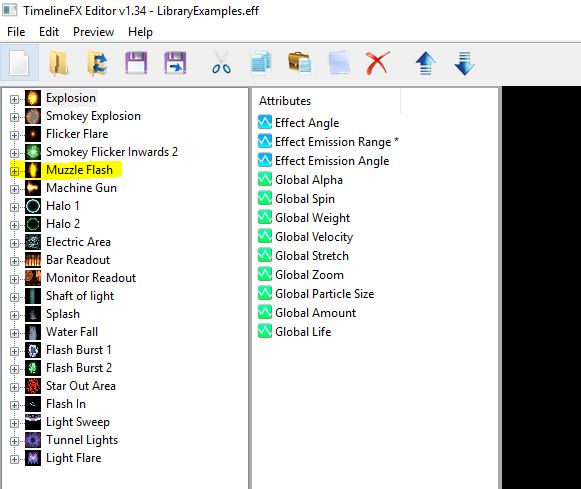
peterigzKeymasterHi, sorry I’m quite busy with day job at the moment so some responses are a bit delayed 🙂
So your folder structure should be like this:
example.monkey
example.data
—myeffectsSo myeffects is the folder that contains your unzipped effects file. Then in the example.monkey code, you need to change the line:
MyEffects = LoadEffects(“explosions”)
to:
MyEffects = LoadEffects(“myeffects”)
and then get whichever effect you want in your library with this line:
MyEffect = MyEffects.GetEffect(“toon explosion 2”)
so change “toon explosion 2” to whatever the name of your effect is. Hope that helps!
-
This reply was modified 9 years, 5 months ago by
peterigz.
peterigzKeymasterI mean in the monkey file “ParticleManager.monkey” there is a line that loads that effect, so you’ll need to change that to the effect that you have in your effects file.
peterigzKeymasterLooks to me like the handle of the particle images are all defaulting to the top left of the shape, or wrong in some way but it’s hard to say. If you can give me instructions how to set up an SDL project in C++ I might be able to help but i can’t promise anything as my c++ is limited!
peterigzKeymasterHi, your English is fine 🙂 In the code you should see where it is loading “toon explosion 2”, you will need to change that to whatever effect is in your file. Also, I’m not sure if you realise but you can export as a zip from the editor: File > Export, which will be a bit more easier and tailored for unzipping into a monkey data folder.
peterigzKeymasterHi Damucz, you did a great job on the c++ version, you remind me I should highlight this library more on this site! I also noticed someone has done a javascript version too: https://github.com/gooddoggy/timelinefx
peterigzKeymasterThe frame is either the time in milliseconds when that value is applied from the start of the effect, or if it’s an “overtime” attribute then it will be a percent of the lifetime of the effect. So for example, if the particle has a lifetime of 3000ms (3 seconds), then a frame of 0.5 will mean that that attributes value will be at 1500ms or 50% into the particles lifetime. Values at any given time are linear interpolated between values, or interpolated with bezier curves if curves are used in the editor.
Yes the animation properties is only for the exporting of the effects and do not affect anything with the attributes.
Hope that helps!
peterigzKeymasterHi, yes there’s not much documentation on the xml file! Type is whether it’s a point, area, line or elipse effect. These consts in the module might help shed some light:
Const tlPOINT_EFFECT:Int = 0
Const tlAREA_EFFECT:Int = 1
Const tlLINE_EFFECT:Int = 2
Const tlELLIPSE_EFFECT:Int = 3

Const tlCONTINUOUS:Int = 0
Const tlFINITE:Int = 1

Const tlANGLE_ALIGN:Int = 0
Const tlANGLE_RANDOM:Int = 1
Const tlANGLE_SPECIFY:Int = 2

Const tlEMISSION_INWARDS:Int = 0
Const tlEMISSION_OUTWARDS:Int = 1
Const tlEMISSION_SPECIFIED:Int = 2
Const tlEMISSION_IN_AND_OUT:Int = 3

Const tlEND_KILL:Int = 0
Const tlEND_LOOPAROUND:Int = 1
Const tlEND_LETFREE:Int = 2
TimelineFX is quite complex so it will depend on what you’re trying to convert to on how smooth this will go I guess.
peterigzKeymasterHi, I am based in the UK so the prices are in GBP, not euros. At the moment the pound is quite weak so if you’re converting then it will probably be cheaper than usual.
peterigzKeymasterI’m guessing you mean how do you export to a sprite sheet? Click on the effect you want to export then under the edit menu you’ll find “Animation Properties” where you can configure and export the animation there. See here for more details: http://www.rigzsoft.co.uk/timelinefx-help/#AnimationProperties
-
This reply was modified 9 years, 5 months ago by
-
AuthorPosts
