peterigz

Forum Replies Created
-
AuthorPosts
-
peterigzKeymasterHi, this is usually caused because the alpha of the particle does not fade out to 0, and it’s also better to fade in the alpha as well, but it can depend on the effect. With your effect, try unchecking Single particle on the particle tab, increase the amount graph to 4, and reduce the level of alpha you’re using to much lower (to avoid saturation), and make it fade in and fade out. I’m not on my work PC to save the changes I made, but I’ll upload my changes tomorrow so you can see what I did if you’re still struggling.
peterigzKeymasterGlad you like it!
peterigzKeymasterHi,
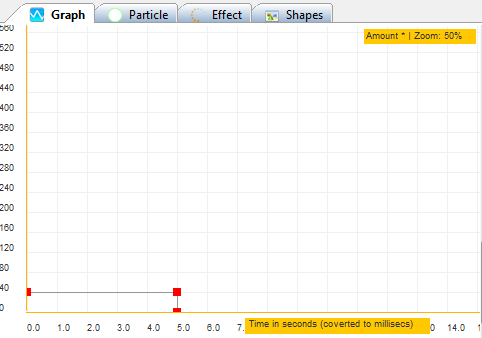
Some effects will just keep emitting particles forever, this is dictated by the amount graph. So for example the toxic effect, if you look at the fire emitter in that effect you’ll see that there is only one node on the graph set at 40. That means it will just keep spawning particles until you call effect.softkill or effect.hardkill.
So if you want to end the effect ingame, just use softkill or hardkill (softkill will stop the emitter emitting, so the remaining particles die natually, and hardkill stops the effect immediately).
If you want the effect to end after 5 seconds by design, then you need to add an extra couple of nodes on the amount graph, and set them to 0 after 5 seconds. See screenshot:
Hope that helps 🙂
peterigzKeymasterHi, unfortunately there are no plans as yet to develop a 3D version of TimelineFX.
I think you can replace your profile image, in the top right go to Edit my Profile, you should be able to do it there.
peterigzKeymasterI’ve just updated the library and implemented CheckCollision and PreventOverlap functions. I added a couple of examples to the example folder as well, see CheckCollision.monkey for an example of use, it’s pretty straight forward 🙂
peterigzKeymasterFOV would be an angle, so the arc to check within. The direction is the way the observer is facing, so it will check either side of the direction. So if FOV is 45, then it will check 22.5 deg to the left and right of the direction. This is infinite though so you might want to put a separate distance check if needed.
I should update the module so it uses strict really, not sure why I didn’t!
peterigzKeymasterHey, I’ll take a look tonight, I see that I’ve omitted examples of using the collision code, I do have a few so I’ll upload them tonight. This is a conversion of the Blitzmax version which had a CheckCollision function that would use casting as you mentioned, but I probably didn’t convert it because callbacks were involved. You have to implement callbacks differently in Monkey so as a result I didn’t implement few features of this collision system yet (like quadtrees for example), but I can’t see why I couldn’t make a checkcollision function that just returns a tlCollisionResult.
Will let you know how I get on 🙂
peterigzKeymasterGlad you got it working, sorry I haven’t responded until now but I’ve been moving house and currently have no internet! It would be interesting to see if this behaviour is replicated on the blitzmax version… I’m not convinced it should work like that so will investigate, at least you have it working for now.
peterigzKeymasterThat’s odd, the only I can think that would do that would be if the config file got damaged some how, or just couldn’t be read from.
peterigzKeymasterI’ve just updated the Monkey module so it will work with the latest version of Diddy and Monkey.
Thanks for the bug report! 🙂
peterigzKeymasterHmm, it uses diddy just for the XML parser, so maybe that’s changed somehow, I’m not sure. I’ll test with the latest version of everything when I get home tomorrow.
peterigzKeymasterI’ve uploaded the little shootem up example that’s here on this site so you can have a look at the code and see if you’re doing anything different, link here: http://www.rigzsoft.co.uk/files/MonkeyExample.zip
It’s quite small so hopefully it’s easy to follow.
How are you adding the effects to the particle manager? Are you making sure that you copy them first? Maybe you could post a little snippet for the shield hit.
peterigzKeymasterHi, I do recall this when I was testing the Monkey version but can’t remember what it was, maybe something to do with emitters that are relative, or something to do with how you’re setting the particle manager origin. I have used it with a virtual resolution and had it working fine, I just need to look at the code again.
I’m at work at the moment but will check when I get back home. Have you got a simple bit of code to replicate the issue in the meantime?
peterigzKeymasterAhh, that’s interesting, well spotted 🙂 I shall look into that.
peterigzKeymasterWell done for getting out of the day job 🙂
You’re right about the space creature, I remember looking into that and thought I’d fixed it. Was quite a while ago now, maybe it’s crept back in somehow. It could well be a rounding issue. If I remember correctly that effect has single emitters that never die, they just have sub effects that spawn the tail of the worm. So it’s something in way that they rotate I think, thinking back it maybe have been something that happens when the angle passes from 360 back to 0, something jolts so they slowly spiral outwards. I can’t remember for sure I’ll have to take a look again 🙂
-
AuthorPosts
