Alpha 36 is now available to download with a whole bunch of new things, a lot of which is API related. Here are the main headlines:
TFX files can now be saved as folders
I’ve been wanting to do this for a while now, .tfx files are basically binary files which is fine but if you’re tracking changes in a repository like git then every change means that the entire binary gets committed which if you have a lot of shapes stored in the library means that it can very quickly ramp up the amount of space that it takes up in your repo. By saving the library to a folder the effects.txt containing the properties for all the effects and emitters in the library are saved separately and because it’s just a text file it’s much more repo friendly. You’ll find the option under the File menu called Convert to folder library. Once converted you can keep saving and it will save to the folder instead. There’s also a separate Open Folder Library too.
Opening a folder library in your game is just the same, just point it to the folder and it will load it just the same as a .tfx file.
Hot reload support, TimelineFX API change
Thanks to ziedbha who opened the pull request on this. If you do hot reloading while you’re working on your game then you can use the new tfx_SuspendContext to stop all work without freeing memory and then tfx_ResumeContext to pick up where you left off. You can pass new callback addresses to tfx_ResumeContext if the old ones are no longer valid, for example after a DLL reload.
The API had a few scattered globals but now they’re all together in a single tfx_context and you can supply your own memory allocator. tfx_InitialiseTimelineFXMemory and tfx_BeginTimelineFX take an optional tfx_allocation_callbacks_t (user data plus allocate and deallocate functions). Every TimelineFX memory pool is allocated through those callbacks. Pass NULL to keep the default allocator.
Hot reloading support for libraries
To help with work flows where you modify effects in the editor and then want to see those changes in your game you can now call tfx_RefreshLibrary and if the library has changed then it will reload all the effects and assets in place and restart any effects that were updated if they are currently running in any stage.
Any new shapes that have been added to the library call your shape_loader callback that you pass in to the function so you can add the new asset to the renderer. Any shapes that were removed call a remove_shape callback so that you can also deal with freeing up the memory for them.
New shape formats and conversions
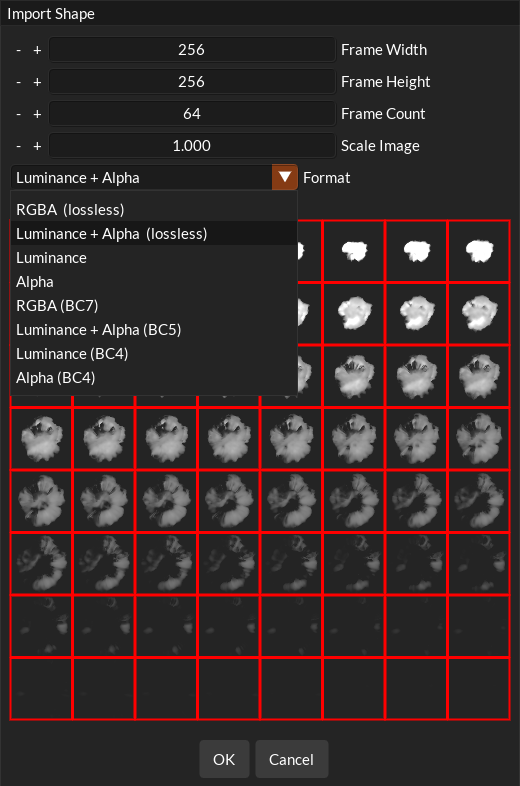
Before this update I was packing all the shapes in a library into sprite sheets because that made it easier to draw all the particles in a single draw call but it also meant that it was a lot more cumbersome when it came to adding/removing shapes because they’d have to be re-packed each time. Since I modified my renderer last year to use descriptor array indexes it meant that I no longer needed to do this. Each shape can now just get it’s own descriptor array index and still be rendered in a single draw call. This also means that different shapes can now be saved in their own format according to what they need. The formats available are:
- 4 channel 8bit png
- 2 channel luminance and alpha .png
- Luminance only .png
- Alpha only .png
- 4 channel rgba raw bitmap
- Alpha only BC4 .ktx2 with its mip chain. Decodes to (1, 1, 1, a), KTXswizzle 111r
- Luminance only BC4 .ktx2 with its mip chain. Decodes to (l, l, l, 1), KTXswizzle rrr1
- Luminance in red and alpha in green, BC5 .ktx2 with its mip chain. Decodes to (l, l, l, a), KTXswizzle rrrg
- 4 channel rgba BC7 .ktx2 with its mip chain
You can convert to any of these formats when you import a new shape to the library and you can also convert existing shapes in the library too, accessed via the shape context menu.
All shapes used to be stored in RGBA8 format but as most shapes you use for particles are alpha/luminance only a lot of memory can be saved. There’s also a new … button on the shapes tab where you can auto convert all shapes in the library to the minimum channels that they require.
Note: format enum tfx_image_format is now a part of the tfx_image_data_t struct that’s passed in to your shape_loader callback so that you can parse it and load the shape however you need to based on the format.
Bookmarks now save into the library
On the preview tab where you can activate “Resimulate on Edit” you can set bookmarks on the time scrubber at various points in the effect. These now save with the library and can be accessed in the library where you can get timings for certain points in the effect using new API functions:
- tfx_GetBookmarkTime: Gets the time of a bookmark by it’s index.
- tfx_IsBookmarkCrossed: Returns true if a bookmark has been crossed according to the current age of the effect.
I also promoted tfx_IsFiniteEffect and tfx_GetEffectLifetime to the API which were internal functions used in the editor only before. They let you know if an effect will stop spawning after a time and the max time that an effect can exist for based on the lifetime attributes of the emitters stored in the effect.
User Spawn Lists
This is a huge optimisation win for the API, something that I’ve been thinking about for a while now. Typically when adding an effect to your game you would add each effect to the stage, get back a tfxEffectID and then make changes via that id. If you need to add many of the same effect then this can become inefficient because each effect has it’s own overhead, each emitter maintains it’s own list of particles to update each getting it’s own thread etc. This was still reasonably fast due to multi-threading and SIMD processing of of the particles but the thread queue gets clogged very quickly and it probably wasn’t great for the cache too.
So now to address this, under effect properties in the editor you can check “Spawn at User Locations”. What this does is allow you to add a single effect to the stage, let’s say an explosion effect and then instead of adding an effect for every explosion that happens in your game, you call tfx_AddSpawnLocation for that effect and get back a tfxSpawnLocationID. All the emitters that are in the effect will now spawn particles at all the spawn locations you add meaning that only the emitters in the effect maintain all the particles that spawn. If the explosion effect had 5 emitters, before if you added 100 explosions you’d have 500 emitters being updated in the stage, but now 100 spawn locations means you still only have 1 effect and 5 emitters updating all the particles at those spawn locations – this is much more efficient. This is also another step towards GPU particle simulation as this is the approach I’ll take for that where it’s likely that they’ll be a compute dispatch per emitter type.
There are some caveats but in general effects that you want lots on screen at once will be perfect candidates for this approach.
A few other additions to the Editor:
- Added new emission type: Disc, for flat 2d disc shapes.
- Added uniform spawning for ellipse and disc emission types.
Here’s the full list of updates in this release:
- New save format – open folder.
- Fixed an issue where deleting a shape from the library would mess up what shapes are drawn in the preview.
- Added functionality to refresh a library with the latest changes without having to reload it all.
- Promoted some internal functions regarding effect lifetimes to API.
- Bookmarks now save into effect files and can be accessed in the API too.
- Shapes can now be stored in narrower formats: RGBA, Luminance + Alpha, Luminance and Alpha PNGs.
- Added block compressed shape formats (BC4, BC5 and BC7 in KTX2 files with mipmaps) that stay compressed on the GPU, with optional zstd supercompression.
- Added a shape image format enum to the library, readable with tfx_GetImageFormat, so shape loaders can handle each format.
- Shapes can be converted to another format from their context menu, and the format can be chosen when importing.
- Imports default to the format with the fewest channels that keeps the shape looking the same.
- Added Convert All Shapes to convert every shape to its minimum channels as PNG or block compressed.
- Shape importing and converting now run in the background, with a spinner on shapes that are still being processed.
- A shape’s file extension now follows its format (.png or .ktx2).
- Added a shape options button next to Load in the Shapes window. Clear Unused Shapes and the shape conversion settings have moved there.
- Added a Shape Formats help page.
- Fixed a bug with single particles with loop count 0 expiring after some time.
- Stripped out any unused functions/structs other unused things in timelinefx library.
- Added an API function to point an effect towards a location – tfx_EffectLookat
- Added new emitter property that allows you to orient the emitter towards the camera on creation.
- Added new emission type: Disc, for flat 2d disc shapes.
- Added uniform spawning for ellipse and disc emission types.
- Fixed saving on close when the library is a folder gets stuck.
- Spawn lists like other emitter but user editable.
- Fixed ribbon preset preview being messed up by previewing another ribbon emitter in the editor preview tab.
- Updated ribbon buffer handling in the API and editor so that it manages multiple stages a lot more easily.
- Change the wording when the library loaded is a higher version.
- Grey out ribbon lag rather then hide as it’s a bit confusing as to why it’s not available.
- Fixed a crash after dragging 2 emitters from one effect to another that have user spawn locations. Emitters were paired with other emitter.
- Fixed a crash when deleting a shape and then restoring history back to a prior state before the shape deletion.
- Fixed a memory leak issue on shutdown after saving an effect file
- Fixed adding an effect via the shape tab but the shape wasn’t actually assigned to the emitter that was created.
- Fixed an issue with effect being restored and losing it’s color/blending info.